Pomodoro Timer
Status: Deployed · Personal project · Configuration and deployment evidence reviewed October 19, 2026
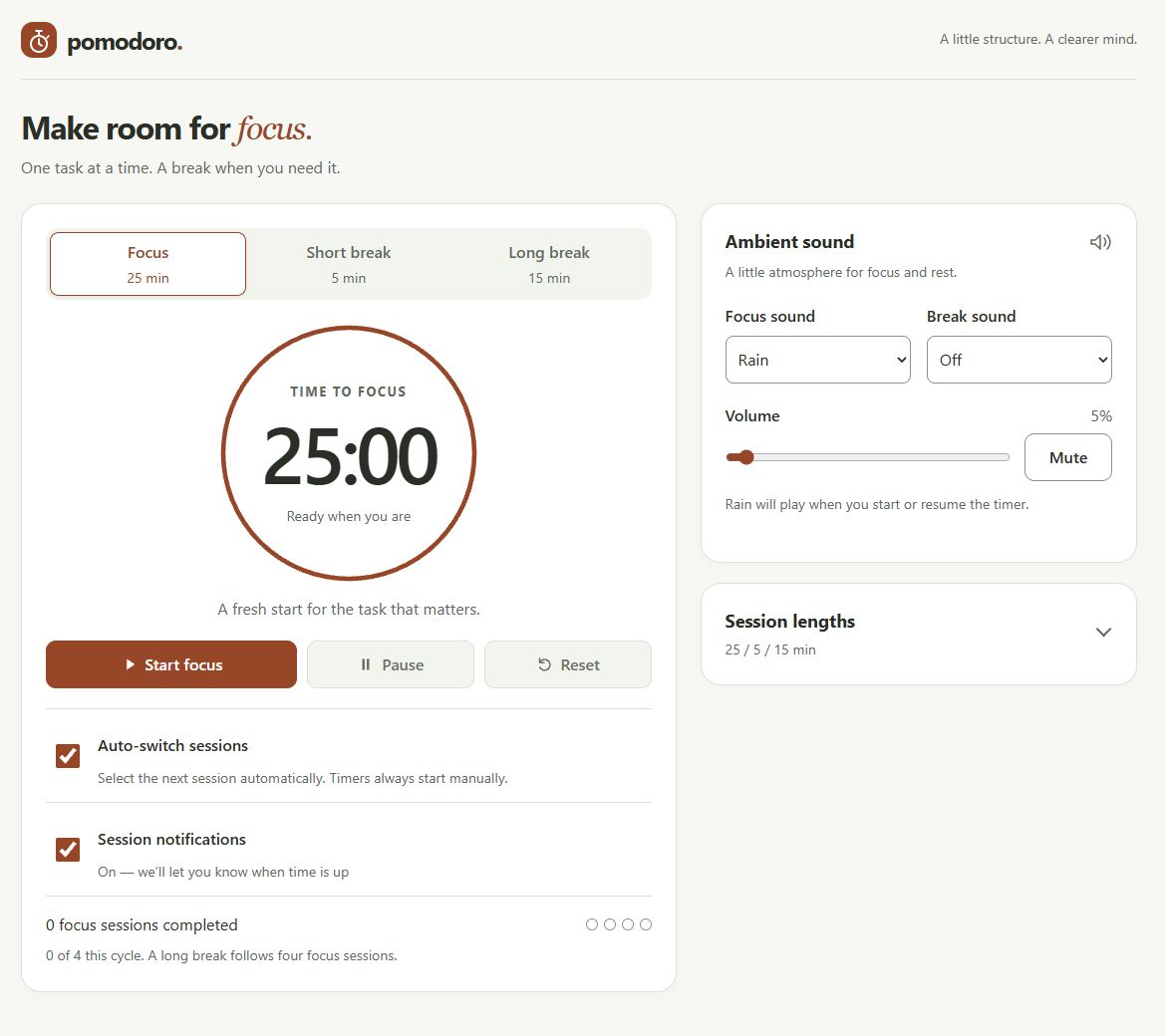
I deployed a Pomodoro timer that gives focused work and regular breaks a simple structure. The application supports adjustable session lengths, ambient sound, notifications, and restoration after a tab reload. My work connected the application to Azure hosting, automated deployment, and a custom domain, including investigating an initial deployment failure.
I configured the cloud hosting, repository connection, and DNS. OpenAI Codex assisted with application implementation, subsequent code and workflow changes, and documentation. The automated results below come from recorded workflow runs; they are not claims of independent manual code review or exhaustive browser testing.
Open the Pomodoro timer · View the source on GitHub
On this page
Application architecture and decisions
The browser owns timing, interface updates, audio, and session state. Express serves files from public/ and exposes /health; it does not expose the repository root. Node.js 24 LTS and Express 5 provide a small server footprint, with Express the only direct npm dependency. There is no database, account system, frontend compilation step, or external asset CDN.
This architecture keeps a personal timer straightforward to host, but state stays in the browser. An absolute finish time lets the display catch up after delayed callbacks; it does not make a suspended browser a reliable background service. Session restoration uses per-tab storage, while preferences use local storage. Closing the page ends notification delivery, and sessions do not synchronize across devices.
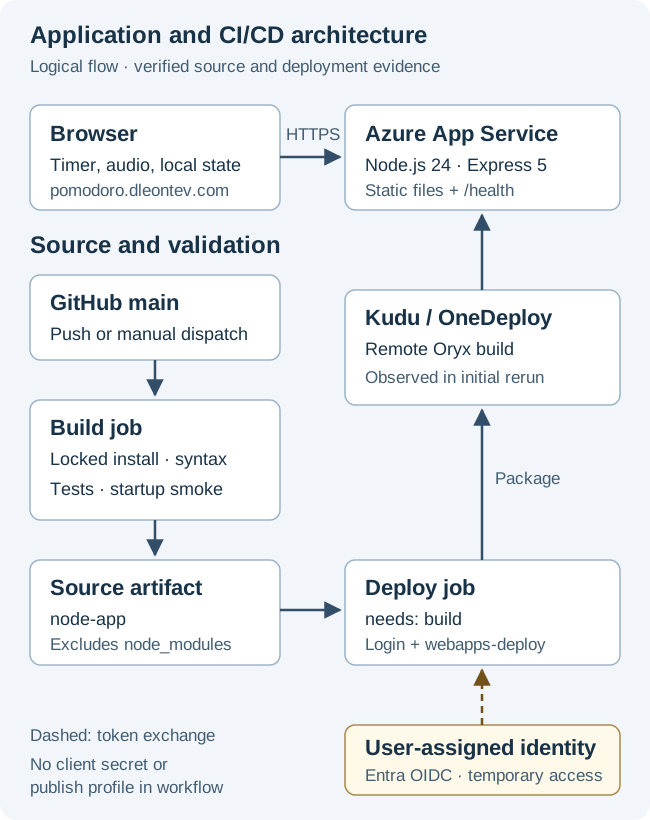
Open the architecture diagram at full size.
Repository and deployment connection
I established the GitHub repository and connected its main branch through Azure Deployment Center using GitHub Actions. Azure generated the initial build-and-deploy workflow. Repository history separates that generated configuration from later Codex-assisted changes that added dependency installation, syntax checks, tests, and startup validation.
That distinction matters: the original successful deployment did not run the validation now present in the workflow. Pushes to main and manual dispatch currently trigger deployment; pull requests receive validation through a separate CI workflow. I did not need to upload application files manually for each subsequent change.
Azure App Service configuration
I hosted the application using App Service’s code publishing model. The verified configuration was:
| Setting | Observed value |
|---|---|
| Operating system and runtime | Linux; Node.js 24 LTS |
| Plan and capacity | Basic B1; one instance |
| Region | West US 3 |
| Transport | HTTPS Only; minimum inbound and SCM TLS 1.2 |
| Basic publishing credentials | Disabled for SCM and FTP |
| Always On / App Service Health Check | Disabled / not configured |
This approach places operating-system hosting under App Service while leaving application startup and dependencies in the repository. The server reads the platform-provided PORT; the package’s production command is npm start, running node server.js. The retained evidence does not establish an Azure startup-command override. One instance and disabled Always On also limit the availability and startup assurances I can make.
Deployment authentication with OIDC
The deployment job grants id-token: write and uses azure/login@v2 to authenticate through GitHub’s OpenID Connect token. The login logs identify the repository’s main branch as the federated subject. Entra validates the GitHub assertion and issues temporary Azure access; Azure authorization then determines what the identity can deploy.
The workflow references client, tenant, and subscription identifiers stored in GitHub secrets, but supplies neither a client secret nor a publish profile. Federation therefore avoids storing a long-lived Azure deployment password in this workflow. Identifiers alone are not authentication credentials.
I used a user-assigned managed identity for the Deployment Center connection. The federated trust lets the GitHub job obtain Azure access as that identity without a stored client secret. Its exact RBAC role and scope have not been verified in this record; successful deployment alone does not demonstrate least privilege. This deployment identity is separate from any runtime identity assigned to the web application.
Validation, artifacts, and Azure remote build
The current deployment workflow runs on Ubuntu. Its build job installs the lockfile with npm ci --ignore-scripts --no-fund, checks JavaScript syntax, runs Node’s tests, and starts the production command for HTTP smoke checks.
Only after these steps succeed does it upload the node-app source artifact, excluding node_modules. The deploy job explicitly declares needs: build, downloads that artifact, authenticates, and uses azure/webapps-deploy@v3 against Production. This dependency gates deployment on its own validation job. The separate CI workflow is not another deployment prerequisite.
The artifact is source, not a precompiled frontend or a copy of the runner’s installed dependencies. During the initial successful deployment, Kudu/OneDeploy explicitly reported “Running oryx build…”. That establishes Azure-side build activity for that attempt; it does not establish the exact remote install command or which setting enabled it. The separate CI pins action revisions; deployment actions currently use version tags.
Investigating the initial failure
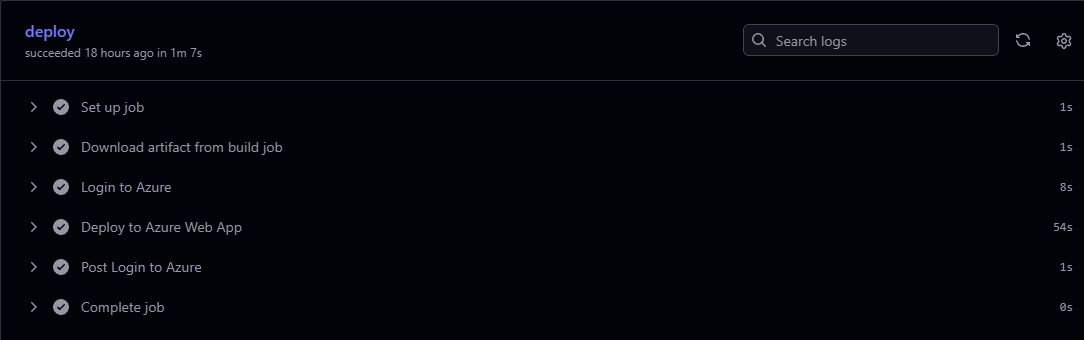
My first deployment failed in the Azure login step with “No subscriptions found”, before the application deployment step ran. I reran without changing settings. The second attempt authenticated successfully and deployed the same commit using the existing successful build artifact.
The useful finding was where the failure occurred: authentication and subscription discovery, rather than application startup. Reusing the artifact helped separate recovery from a code or packaging change. The successful retry established recovery, but not a root cause. I have no evidence that a role correction, tenant change, or configuration fix caused it.
Namecheap DNS, hostname binding, and HTTPS
I used Namecheap DNS to connect pomodoro.dleontev.com to the application. The pomodoro CNAME targets the App Service default hostname. The separate asuid.pomodoro TXT record proves domain ownership to Azure; it does not route browser traffic. Live DNS confirmed both records, and the TXT value matched Azure’s verification value.
Azure lists the custom hostname as Secured, with an SNI SSL binding. HTTPS requests to the custom domain passed normal certificate validation, and HTTP redirected to HTTPS. These checks establish working routing, hostname binding, and certificate delivery at review time. The certificate’s managed-versus-uploaded origin and renewal configuration were not confirmed, so I do not claim automatic renewal.
Verification and operational limits
The deployment run for revision b6cee9b recorded 42 tests passed, zero failures, and zero skips, followed by successful production-startup checks of / and /health. Live checks also returned HTTP 200 for both endpoints over the custom HTTPS domain.
These results cover defined automated cases and endpoint availability. Audio lifecycle tests use test doubles; the application has no automated browser end-to-end or accessibility audit suite. Its /health route is not an enabled App Service health probe. I have not established load capacity, continuous availability, or background notification reliability through these checks.
Lessons and tradeoffs
The deployment failure made the boundaries between source validation, Azure authentication, remote build, and runtime behavior concrete. A green retry is useful evidence of recovery, but an explanation needs more than correlation.
The final arrangement keeps hosting and delivery manageable for a small application. It also deploys directly to Production, packages source broadly, and relies on browser-local state. A staging environment, narrower deployment-file allowlist, and application browser tests would address specific limits; they are future improvements, not capabilities demonstrated by this deployment.